Front Panel LCD Display
The front panel LCD Display is shown in the following figure:
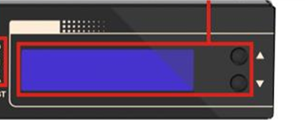
The LCD display includes two rows:
| ■ | The content of the first row is described in the subsequent table. |
| ■ | The second row displays the IP address of the Board Management Controller (BMC) when it's available. |
|
Phase |
1st Row Displayed Message |
Description |
|---|---|---|
|
Server Boot |
"SYSTEM BOOTING" |
Server power-on event. |
|
"BIOS: V5DIAR14" |
Loading BIOS, including information of the BIOS version. |
|
|
"Checking Memory" |
Performing a memory test. |
|
|
"Hardware initialization" |
Hardware testing and initialization. |
|
|
Boot Loader |
"Booting…" |
Loading bootloader. |
|
"Starting System" |
Running bootloader. |
|
|
SBC Loading and Running |
"SBC Initializing" |
SBC is application is initializing. |
|
"SBC Loading" |
SBC is application is loading. |
|
|
"Standalone" |
No High Availability (HA) license - the device is running in standalone mode. |
|
|
"No HA configured" |
HA license exists but HA configuration is not completed - the device is running in standalone mode. |
|
|
"HA synchronizing" |
HA synchronization between Active and Redundant device. |
|
|
"HA inactive" |
HA is not operational - device in standalone mode. |
|
|
"HA active" |
HA is operational and this is the Active device. |
|
|
"HA redundant" |
HA is operational and this is the Redundant device. |
The High Availability (HA) system requires:
| ● | Two Mediant 7000 servers - one server functions as the Active and the other server functions as the Redundant. |
| ● | Both servers have the HA license. |
| ● | Minimum HA configuration on both servers (refer to the Mediant 7000 User's Manual). |
| ● | Configured and wired network Maintenance interfaces (refer to the Mediant 7000 User's Manual). |